

Pass Exam With Full Sureness - SPLK-1002 Dumps with 286 Questions
Verified SPLK-1002 dumps Q&As - 100% Pass from Exam4Docs
NEW QUESTION # 98
What is a limitation of searches generated by workflow actions?
- A. Searches generated by workflow actions cannot use macros.
- B. Searches generated by workflow actions must run in the same app as the workflow action.
- C. Searches generated by workflow actions must be less than 256 characters long.
- D. Searches generated by workflow actions run with the same permissions as the user running them.
Answer: A
Explanation:
Explanation/Reference:
NEW QUESTION # 99
Which workflow action method can be used the action type is set to link?
- A. GET
- B. UPDATE
- C. Search
- D. PUT
Answer: A
Explanation:
Explanation
https://docs.splunk.com/Documentation/Splunk/8.0.2/Knowledge/SetupaGETworkflowaction Define a GET workflow action Steps
* Navigate to Settings > Fields
* Click New to open up a new workflow action form.
* Define a Label for the action.
The Label field enables you to define the text that is displayed in either the field or event workflow menu.
Labels can be static or include the value of relevant fields.
* Determine whether the workflow action applies to specific fields or event types in your data.
Use Apply only to the following fields to identify one or more fields. When you identify fields, the workflow action only appears for events that have those fields, either in their event menu or field menus. If you leave it blank or enter an asterisk the action appears in menus for all fields.
Use Apply only to the following event types to identify one or more event types. If you identify an event type, the workflow action only appears in the event menus for events that belong to the event type.
* For Show action in determine whether you want the action to appear in the Event menu, the Fields menus, or Both.
* Set Action type to link.
* In URI provide a URI for the location of the external resource that you want to send your field values to.
Similar to the Label setting, when you declare the value of a field, you use the name of the field enclosed by dollar signs.
Variables passed in GET actions via URIs are automatically URL encoded during transmission. This means you can include values that have spaces between words or punctuation characters.
* Under Open link in, determine whether the workflow action displays in the current window or if it opens the link in a new window.
* Set the Link method to get
* Click Save to save your workflow action definition.
NEW QUESTION # 100
In most large Splunk environments, what is the most efficient command that can be used to group events by fields?
- A. stats
- B. transaction
- C. streamstats
- D. join
Answer: A
Explanation:
Explanation/Reference: https://answers.splunk.com/answers/103/transaction-vs-stats-commands.html
NEW QUESTION # 101
Which of the following statements describe the search below? (select all that apply)
Index=main I transaction clientip host maxspan=30s maxpause=5s
- A. The first and last events are no more than 5 seconds apart.
- B. Events in the transaction occurred within 5 seconds.
- C. The first and last events are no more than 30 seconds apart.
- D. It groups events that share the same clientip and host.
Answer: B,C,D
Explanation:
The search below groups events by two or more fields (clientip and host), creates transactions with start and
end constraints (maxspan=30s and maxpause=5s), and calculates the duration of each transaction.
index=main | transaction clientip host maxspan=30s maxpause=5s
The search does the following:
It filters the events by the index main, which is a default index in Splunk that contains all data that is not
sent to other indexes.
It uses the transaction command to group events into transactions based on two fields: clientip and host.
The transaction command creates new events from groups of events that share the same clientip and host
values.
It specifies the start and end constraints for the transactions using the maxspan and maxpause
arguments. The maxspan argument sets the maximum time span between the first and last events in a
transaction. The maxpause argument sets the maximum time span between any two consecutive events
in a transaction. In this case, the maxspan is 30 seconds and the maxpause is 5 seconds, meaning that
any transaction that has a longer time span or pause will be split into multiple transactions.
It creates some additional fields for each transaction, such as duration, eventcount, startime, etc. The
duration field shows the time span between the first and last events in a transaction.
NEW QUESTION # 102
Which of the following statements describe the search below? (select all that apply) Index=main I transaction clientip host maxspan=30s maxpause=5s
- A. The first and last events are no more than 5 seconds apart.
- B. Events in the transaction occurred within 5 seconds.
- C. The first and last events are no more than 30 seconds apart.
- D. It groups events that share the same clientip and host.
Answer: B,C,D
Explanation:
The search below groups events by two or more fields (clientip and host), creates transactions with start and end constraints (maxspan=30s and maxpause=5s), and calculates the duration of each transaction.
index=main | transaction clientip host maxspan=30s maxpause=5s
The search does the following:
* It filters the events by the index main, which is a default index in Splunk that contains all data that is not sent to other indexes.
* It uses the transaction command to group events into transactions based on two fields: clientip and host.
The transaction command creates new events from groups of events that share the same clientip and host values.
* It specifies the start and end constraints for the transactions using the maxspan and maxpause arguments. The maxspan argument sets the maximum time span between the first and last events in a transaction. The maxpause argument sets the maximum time span between any two consecutive events in a transaction. In this case, the maxspan is 30 seconds and the maxpause is 5 seconds, meaning that any transaction that has a longer time span or pause will be split into multiple transactions.
* It creates some additional fields for each transaction, such as duration, eventcount, startime, etc. The duration field shows the time span between the first and last events in a transaction.
NEW QUESTION # 103
What is the relationship between data models and pivots?
- A. Pivots provide the datasets for data models.
- B. Data models provide the datasets for pivots.
- C. Pivots and data models are the same thing.
- D. Pivots and data models have no relationship.
Answer: B
Explanation:
The relationship between data models and pivots is that data models provide the datasets for pivots. Data models are collections of datasets that represent your data in a structured and hierarchical way. Data models define how your data is organized into objects and fields. Pivots are user interfaces that allow you to create data visualizations that present different aspects of a data model. Pivots let you select options from menus and forms to create charts, tables, maps, etc., without writing any SPL code. Pivots use datasets from data models as their source of data. Pivots and data models are not the same thing, as pivots are tools for visualizing data models. Pivots do not provide datasets for data models, but rather use them as inputs.
Therefore, only statement A is true about the relationship between data models and pivots.
NEW QUESTION # 104
There are several ways to access the field extractor.
Which option automatically identifies the data type, source type, and sample event?
- A. Fields sidebar > Extract New Fields
- B. Event Actions > Extract Fields
- C. Settings > Field Extractions > New Field Extraction
- D. Settings > Field Extractions > Open Field Extractor
Answer: C
Explanation:
Explanation/Reference: https://docs.splunk.com/Documentation/Splunk/8.0.4/Knowledge/Managesearch- timefieldextractions
NEW QUESTION # 105
Which of the following statements describes Search workflow actions?
- A. Search workflow actions can be configured as scheduled searches,
- B. The user can define the time range of the search when created the workflow action.
- C. Search workflow actions cannot be configured with a search string that includes the transaction command
- D. By default. Search workflow actions will run as a real-time search.
Answer: B
Explanation:
Search workflow actions are custom actions that run a search when you click on a field value in your search results. Search workflow actions can be configured with various options, such as label name, search string, time range, app context, etc. One of the options is to define the time range of the search when creating the workflow action. You can choose from predefined time ranges, such as Last 24 hours, Last 7 days, etc., or specify a custom time range using relative or absolute time modifiers. Search workflow actions do not run as real-time searches by default, but rather use the same time range as the original search unless specified otherwise. Search workflow actions cannot be configured as scheduled searches, as they are only triggered by user interaction. Search workflow actions can be configured with any valid search string that includes any search command, such as transaction.
NEW QUESTION # 106
Which of the following searches would create a graph similar to the one below?
- A. index_internal seourcetype=Savesplunker | fields sourcetype, status | transaction status maxspan-id | chart count states by -time
- B. index_internal seourcetype=Savesplunker | fields sourcetype, status | transaction status maxspan-id | start count states
- C. index_internal seourcetype=Savesplunker | fields sourcetype, status | transaction status maxspan-id | timechart count by status
- D. None of these searches would generate a similart graph.
Answer: B
NEW QUESTION # 107
Why would the following search produce multiple transactions instead of one?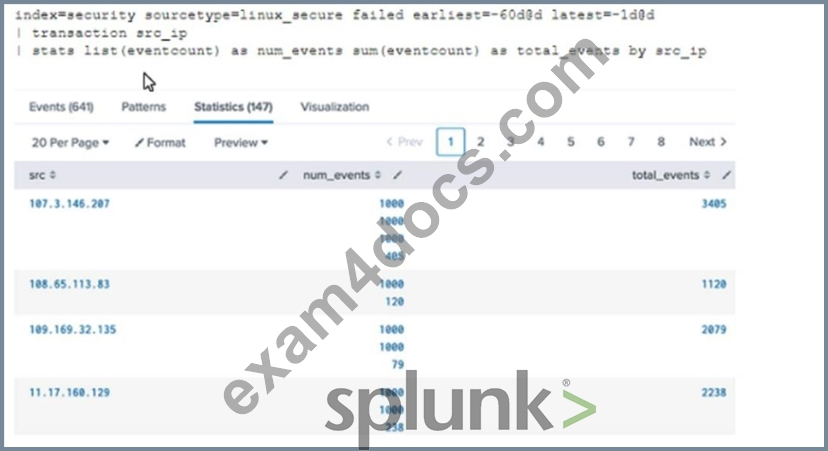
- A. The stats list () function is used.
- B. The transaction command has a limit of 1000 events per transaction.
- C. The maxspan option is not included.
- D. The transaction and commands cannot be used together.
Answer: C
Explanation:
In Splunk, the transaction command is used to group events that share common characteristics into a single transaction1. By default, the transaction command groups all matching events into a single transaction1.
However, you can use the maxspan option to limit the time span of the transactions1. If the time span between the first and last event in a transaction exceeds the maxspan value, the transaction command will start a new transaction1.
Therefore, if the maxspan option is not included in the search, the transaction command might produce multiple transactions instead of one if the time span between the first and last event in a transaction exceeds the default maxspan value1.
Here is an example of how you can use the maxspan option in a search:
index=main sourcetype=access_combined | transaction someuniqefield maxspan=1h In this search, the transaction command groups events that share the same someuniqefield value into a single transaction, but only if the time span between the first and last event in the transaction does not exceed 1 hour1. If the time span exceeds 1 hour, the transaction command will start a new transaction1.
NEW QUESTION # 108
Which of the following can be used with the eval command tostring function (select all that apply)
- A. ''Decimal''
- B. ''commas''
- C. ''hex''
- D. ''duration''
Answer: B,C,D
Explanation:
https://docs.splunk.com/Documentation/Splunk/8.1.0/SearchReference/ConversionFunctions#tostring.28X.2CY.
The tostring function in the eval command converts a numeric value to a string value. It can take an optional
second argument that specifies the format of the string value. Some of the possible formats are:
hex: converts the numeric value to a hexadecimal string.
commas: adds commas to separate thousands in the numeric value.
duration: converts the numeric value to a human-readable duration string, such as "2h 3m 4s".
Therefore, the formats A, B, and D can be used with the tostring function.
NEW QUESTION # 109
Which of the following statements about tags is true?
- A. Tags are searched by using the syntax tag :: <fieldname>.
- B. Tags can make your data more understandable.
- C. Tags are created at index time.
- D. Tags are case insensitive.
Answer: B
Explanation:
Tags are a knowledge object that allow you to assign an alias to one or more field values . Tags are applied to events at search time and can be used as search terms or filters .
Tags can help you make your data more understandable by replacing cryptic or complex field values with meaningful names . For example, you can tag the value 200 in the status field as success, or tag the value 404 as not_found .
NEW QUESTION # 110
How do event types help a user search their data?
- A. Event types categorize events based on a search string.
- B. Event types improve dashboard performance.
- C. Event types can optimize data storage.
- D. Event types improve search performance.
Answer: A
Explanation:
Event types allow users to assign labels to events based on predefined search strings. This helps categorize data and makes it easier to reference specific sets of events in future searches.
References:
Splunk Docs - Event types
NEW QUESTION # 111
How is a Search Workflow Action configured to run at the same time range as the original search?
- A. Select the "Use the same time range as the search that created the field listing" checkbox.
- B. Set the earliest time to match the original search.
- C. Select the same time range from the time-range picker.
- D. Select the "Overwrite time range with the original search" checkbox.
Answer: A
Explanation:
To configure a Search Workflow Action to run at the same time range as the original search, you need to select the "Use the same time range as the search that created the field listing" checkbox. This will ensure that the workflow action search uses the same earliest and latest time parameters as the original search.
NEW QUESTION # 112
By default, how is acceleration configured in the Splunk Common Information Model (CIM) add-on?
- A. Turned on
- B. Turned off
- C. Determined automatically based on the data source.
- D. Determined automatically based on the sourcetype.
Answer: C
Explanation:
By default, acceleration is determined automatically based on the data source in the Splunk Common
Information Model (CIM) add-on. The Splunk CIM Add-on is an app that provides common data models for
various domains, such as network traffic, web activity, authentication, etc. The CIM Add-on allows you to
normalize and enrich your data using predefined fields and tags. The CIM Add-on also allows you to
accelerate your data models for faster searches and reports. Acceleration is a feature that pre-computes
summary data for your data models and stores them in tsidx files. Acceleration can improve the performance
and efficiency of your searches and reports that use data models.
By default, acceleration is determined automatically based on the data source in the CIM Add-on. This means
that Splunk will decide whether to enable or disable acceleration for each data model based on some factors,
such as data volume, data type, data model complexity, etc. However, you can also manually enable or disable
acceleration for each data model by using the Settings menu or by editing the datamodels.conf file.
NEW QUESTION # 113
In what order arc the following knowledge objects/configurations applied?
- A. Field Extractions, Field Aliases, Lookups
- B. Field Extractions, Lookups, Field Aliases
- C. Field Aliases, Field Extractions, Lookups
- D. Lookups, Field Aliases, Field Extractions
Answer: A
NEW QUESTION # 114
This function of the stats command allows you to return the middle-most value of field X.
- A. Median(X)
- B. Values(X)
- C. Eval by X
- D. Fields(X)
Answer: A
NEW QUESTION # 115
......
SPLK-1002 Dumps Full Questions - Exam Study Guide: https://www.exam4docs.com/SPLK-1002-study-questions.html
Pass SPLK-1002 Exam in First Attempt Guaranteed 2024 Dumps: https://drive.google.com/open?id=1mJGZ6vhlphdVfTZjxLI9P_jxnrtGKdnJ
