

Assume Microsoft AB-900 Dumps PDF Are going to be The Best Score
Microsoft 365 Certified AB-900 Exam and Certification Test Engine
Microsoft AB-900 Exam Syllabus Topics:
| Topic | Details |
|---|---|
| Topic 1 |
|
| Topic 2 |
|
| Topic 3 |
|
NEW QUESTION # 58
Your company uses Microsoft 365 Copilot pay-as-you-go billing.
The company wants greater visibility into Copilot usage costs and the ability to forecast departmental spending.
You need to ensure that you can see Copilot costs by department.
What should you use? To answer, select the appropriate options in the answer area.
NOTE: Each correct selection is worth one point.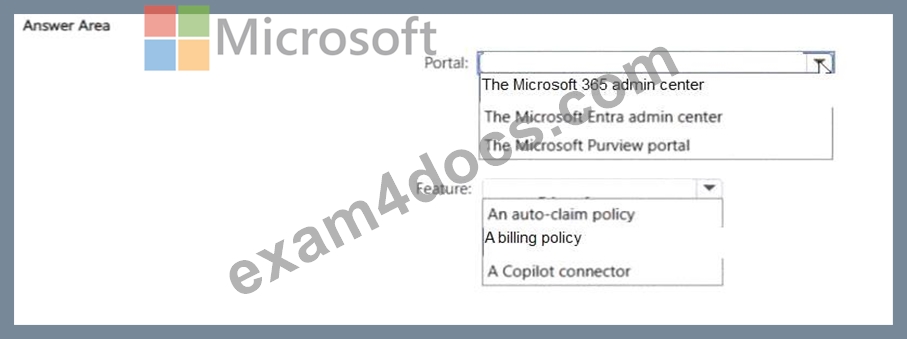
Answer:
Explanation: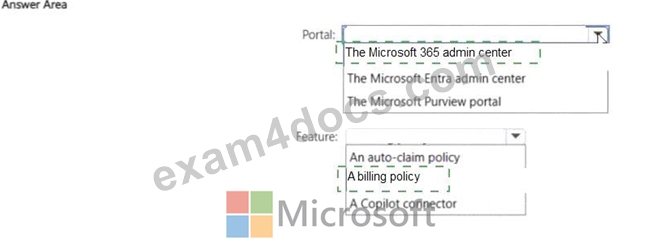
Explanation:
The correct selections are The Microsoft 365 admin center and A billing policy . Microsoft documents that Microsoft 365 Copilot pay-as-you-go is administered in the Microsoft 365 admin center , specifically under Copilot > Billing & usage , where admins create and manage billing policies . Microsoft explains that a billing policy defines the billing infrastructure for pay-as-you-go, including the Azure subscription and the set of users covered by that policy. That user scoping is what allows organizations to separate usage and spending by groups such as departments.
Microsoft also documents that billing policies support budgets , spending views , and monitoring current expenses for services linked to the policy. This supports the requirement for greater visibility into Copilot usage costs and forecasting departmental spending. By assigning different departments to different billing policies, the organization can track Copilot costs by department. The other listed features do not fit: auto- claim policy is unrelated to cost tracking, and Copilot connector is for external data grounding, not billing segmentation.
NEW QUESTION # 59
Your organization has a Microsoft 365 subscription that contains a user named User1.
User1 plans to leave your company in two weeks.
You need to capture the activity of User1 to identify whether the user is exfiltrating data.
Which Microsoft Purview solution should you use?
- A. Communication Compliance
- B. Data Lifecycle Management
- C. Insider Risk Management
- D. Data Security Posture Management
Answer: C
Explanation:
To capture a user's activity and check for data exfiltration using Microsoft Purview Insider Risk Management, follow these steps:
1. Prerequisites and Licensing
2. Initial Setup
*-> 3.Create an Insider Risk Policy
Navigate to Solutions > Insider Risk Management > Policies in the Microsoft Purview portal.
Select Create policy and choose a template focused on exfiltration, such as Data leaks or Data theft by departing users.
Scope the policy: Under the Users and groups page, select Include specific users and groups and add the individual user you want to monitor.
Select Indicators: Choose specific exfiltration indicators like downloading files from SharePoint, sending emails with attachments to external recipients, or copying data to USB devices.
Triggering Events: Define what starts the monitoring, such as a Data Loss Prevention (DLP) policy match or a specific exfiltration activity.
4. Monitor and Investigate
Reference:
https://learn.microsoft.com/en-us/purview/insider-risk-management-configure
NEW QUESTION # 60
A user named User1 is responsible for quarterly sales reporting.
User1 needs to identify performance trends, generate visual insights, and create a summary of anomalies across multiple files that contain various datasets.
What should you use?
- A. Copilot in Excel
- B. the Analyst agent in Microsoft 365 Copilot
- C. Microsoft 365 Copilot Search
- D. the Researcher agent in Microsoft 365 Copilot
Answer: B
Explanation:
If you want to identify performance trends, generate visual insights, and create a summary of anomalies across multiple files that contain various datasets within the Microsoft 365 environment, you should use the Analyst agent in Microsoft 365 Copilot.
The Analyst agent is a specialized, AI-powered assistant designed for advanced data analysis.
Key Capabilities of the Analyst Agent
Multi-file Data Integration: It can automatically import and consolidate data from various sources, including Excel spreadsheets, CSV files, and databases, saving time on manual data wrangling.
Advanced Analysis: The agent employs advanced reasoning and can run Python code to perform complex calculations, identify trends and correlations, and detect outliers or anomalies.
Visual Insights: It automatically generates charts, graphs, and dashboards from raw data to help you understand and communicate the findings effectively.
Actionable Reports: You can get easy-to-read reports based on your questions, with the output presented in clear language and formatting that surfaces key insights and can include visuals.
Natural Language Interaction: Users can simply ask questions in natural language, and the agent will perform the complex analysis steps without requiring advanced expertise in data analytics.
Incorrect:
[Not B]
The Researcher agent in Microsoft 365 Copilot, in contrast, focuses on multi-step knowledge synthesis and gathering information from a wide range of internal (emails, meetings, files) and external (web) sources. It is best for tasks such as:
Compiling comprehensive reports with citations.
Conducting market or competitive analysis.
Synthesizing information on a broad, complex topic.
Reference:
https://www.microsoft.com/en-us/microsoft-365/blog/2025/06/02/researcher-and-analyst-are-now-generally-available-in-microsoft-365-copilot
NEW QUESTION # 61
Select the answer that correctly completes the sentence.
Microsoft Entra Privileged Identity Management (PIM) provides time-bound role activation .
Answer:
Explanation:
Explanation:
time-bound role activation
The correct answer is time-bound role activation . Microsoft Learn explains that Microsoft Entra Privileged Identity Management (PIM) allows users to be made eligible for privileged roles and then activate those roles only when needed. Microsoft also states that once activated, the role is active for a preconfigured period of time , after which the privileged access expires automatically. This is the core just- in-time and time-limited access model that PIM is designed to provide. ( learn.microsoft.com ) The other options do not match Microsoft's definition of PIM. It is not primarily described as providing restricted access to Microsoft 365 services , the lifecycle management of users , or the management of enterprise applications . Those areas relate more closely to other Microsoft Entra and Microsoft 365 governance capabilities. Microsoft specifically positions PIM as a service to manage, control, and monitor access to important resources by using eligible assignments , approval workflows , MFA if required , and temporary role activation . Therefore, the phrase that correctly completes the sentence is time-bound role activation . ( learn.microsoft.com )
NEW QUESTION # 62
Hotspot Question
For each of the following statements, select Yes if the statement is true. Otherwise, select No.
NOTE: Each correct selection is worth one point.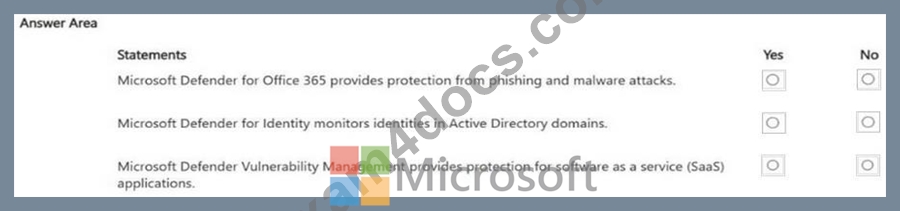
Answer:
Explanation: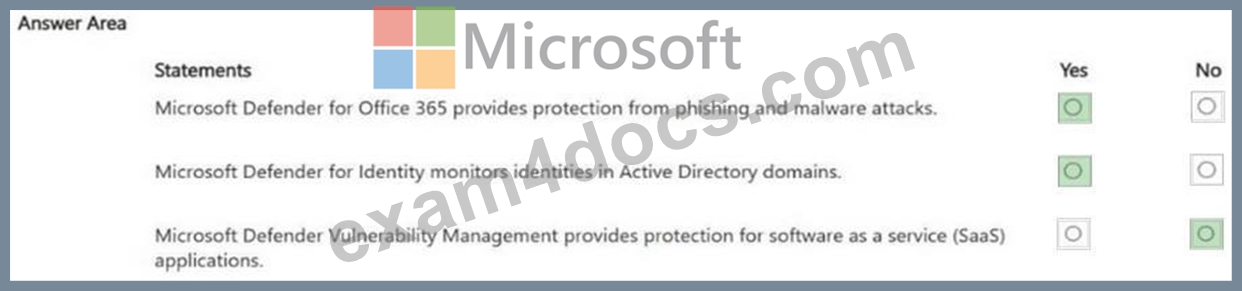
NEW QUESTION # 63
Your organization has a Microsoft 365 subscription.
You discover that Microsoft SharePoint files are being shared to users outside your organization.
You need to identify which files are being shared to the external users.
Which report should you use in the SharePoint admin center? To answer, select the appropriate report in the answer area.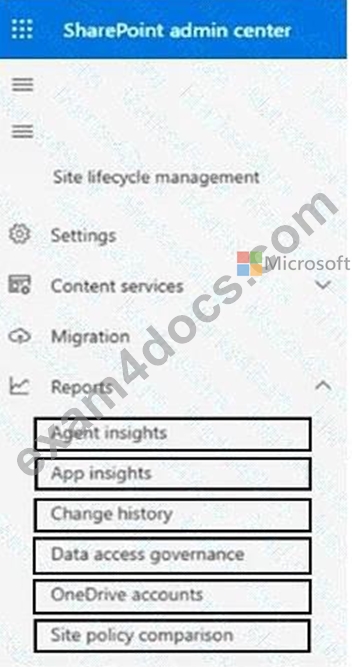
Answer:
Explanation: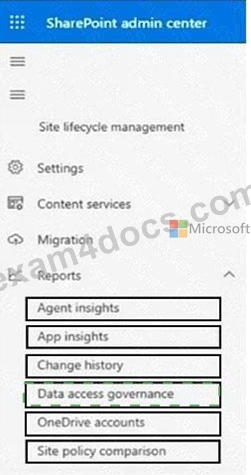
Explanation:
The correct answer is Data access governance . Microsoft documents that Data access governance reports in the SharePoint admin center help administrators discover overshared or sensitive SharePoint content and assess sharing exposure. More specifically, Microsoft's sharing links activity reports under Data access governance are designed to monitor sharing activity and identify sites where links such as Anyone , People in the organization , and Specific people links have been created. This is the SharePoint admin reporting area Microsoft provides for investigating external sharing patterns and related exposure.
The other listed reports do not fit this requirement. Agent insights is for Copilot/agent usage, App insights is for application-related insights, Change history tracks configuration changes, OneDrive accounts focuses on OneDrive administration, and Site policy comparison compares site settings. None of those is the SharePoint report family intended for identifying externally shared SharePoint content. Based on Microsoft's documentation, the report area you should use is Data access governance .
NEW QUESTION # 64
Select the answer that correctly completes the sentence.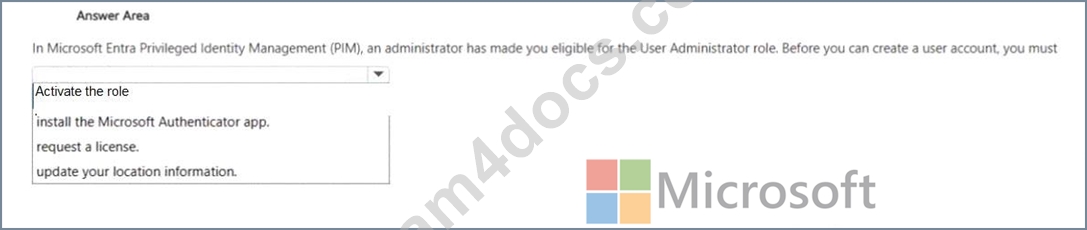
Answer:
Explanation:
The correct answer is Activate the role. Microsoft Learn states that in Microsoft Entra Privileged Identity Management (PIM), when a user is made eligible for a Microsoft Entra role, they do not immediately have the permissions of that role. Microsoft specifically explains that eligible users must activate the role assignment before using the role. Only after activation does the user receive the permissions associated with that role for the approved time period.
That means if you are only eligible for the User Administrator role, you cannot create user accounts until you activate that role in PIM. The other options are incorrect because installing Microsoft Authenticator, requesting a license, or updating location information are not the universal prerequisite stated by Microsoft for using an eligible PIM role. Multifactor authentication can be required during activation depending on policy, but the core required action is still to activate the role first. Microsoft also notes that activation can involve entering a reason, selecting a duration, and completing any required approval or MFA steps.
NEW QUESTION # 65
Hotspot Question
For each of the following statements, select Yes if the statement is true. Otherwise, select No.
NOTE: Each correct selection is worth one point.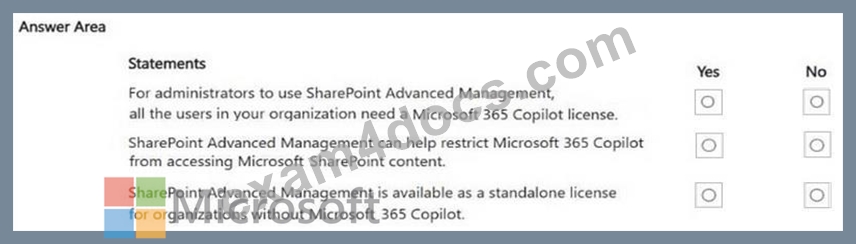
Answer:
Explanation: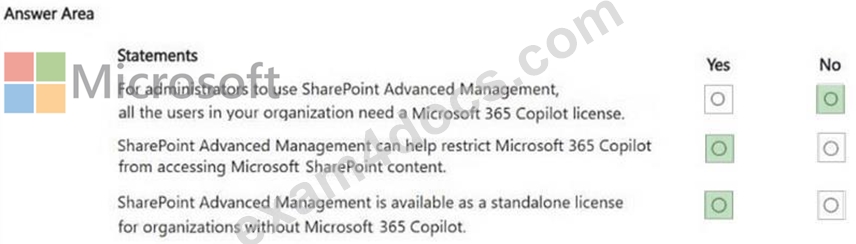
NEW QUESTION # 66
Hotspot Question
Select the answer that correctly completes the sentence.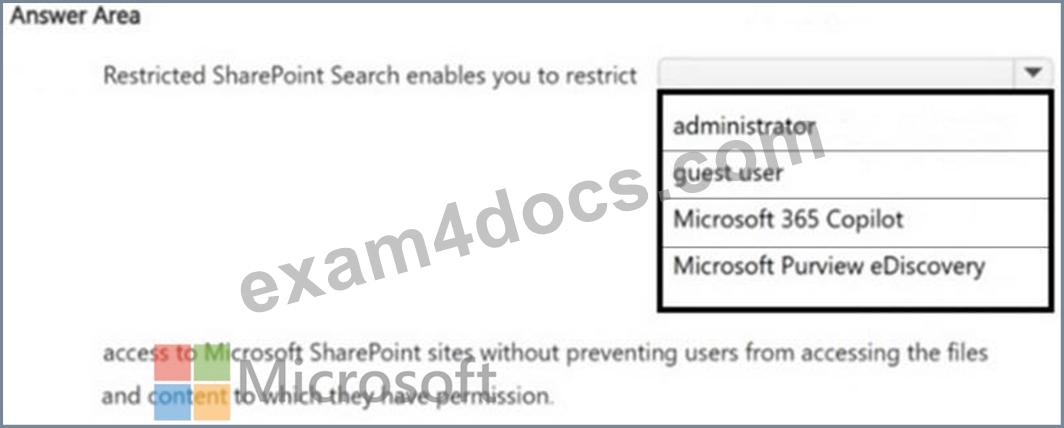
Answer:
Explanation: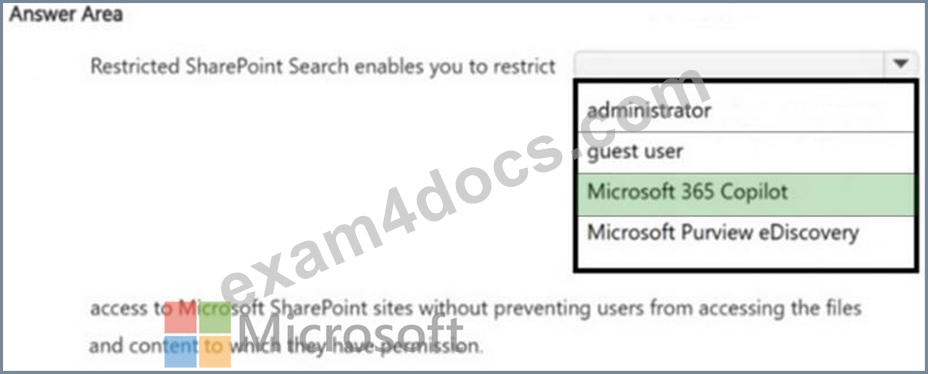
NEW QUESTION # 67
Your organization has a Microsoft 365 subscription.
All users are assigned a Microsoft 365 Copilot license.
You need to prevent the users from generating images by using Copilot.
What should you use?
- A. the Microsoft Defender portal
- B. the Microsoft 365 admin center
- C. the Microsoft Purview portal
- D. the Microsoft Entra admin center
Answer: B
Explanation:
To prevent users with Microsoft 365 Copilot licenses from generating images, you can use the Microsoft 365 admin center.
Steps to Disable Image Generation
Sign in to the Microsoft 365 admin center (admin.microsoft.com).
In the left navigation menu, go to Copilot > Settings.
Select the Copilot actions tab.
Select Copilot image generation.
Turn off the option that allows users to ask Copilot to create, design, and edit images.
When this setting is disabled, Copilot will not generate new images and will instead respond with stock or brand images.
Reference:
https://learn.microsoft.com/en-us/copilot/microsoft-365/microsoft-365-copilot-page
NEW QUESTION # 68
A user is blocked from signing in and the admin suspects Conditional Access or a risky sign-in detection. Which two tools in the Microsoft Entra admin center should the administrator use first to identify the exact sign-in failure and which policy caused it? (Select TWO)
- A. Exchange Online Message Trace
- B. Sign-in logs and Troubleshoot and support in Microsoft Entra ID
- C. Microsoft Entra ID Application proxy
- D. Conditional Access What If tool
- E. Microsoft 365 Service Health dashboard
Answer: B,D
Explanation:
Option A: This tool allows the administrator to simulate a sign-in for a specific user under specific conditions (e.g., location, device state) to determine which Conditional Access policies would apply and whether they would result in a grant or a block. This is ideal for pre-emptively troubleshooting a suspected Conditional Access block.
Option C: The Sign-in logs are the definitive source of truth for all sign-in attempts, providing the outcome, the reason for failure (including block by Conditional Access or ID Protection), and the policy name that was applied. The Troubleshoot and support blade often provides targeted troubleshooting flows for sign-in and access issues.
References:
https://learn.microsoft.com/en-us/entra/identity/conditional-access/what-if-tool
https://learn.microsoft.com/en-us/entra/identity/monitoring-health/concept-sign-ins
https://learn.microsoft.com/en-us/entra/identity/monitoring-health/concept-sign-in-log-activity- details
NEW QUESTION # 69
Your organization has a Microsoft 365 E5 subscription.
You create a Microsoft Purview sensitivity label named Label1.
You need to ensure that users can apply Label1 to files in Microsoft 365.
What should you use?
- A. a retention label policy
- B. an auto-labeling policy
- C. a trainable classifier
- D. a sensitivity label policy
Answer: D
Explanation:
To allow users to manually apply a sensitivity label to files in Microsoft 365, you must create and publish a sensitivity label policy (also known as a label publishing policy).
While the label itself defines the protection settings (like encryption or watermarks), it remains invisible to users until it is included in a policy and published to them.
Reference:
https://learn.microsoft.com/en-us/purview/create-sensitivity-labels
NEW QUESTION # 70
You have a Microsoft SharePoint site named Site1 and a security group named Group1.
You need to prevent all users that currently have access to Site1 from accessing the site content unless the user is also a member of Group1.
Which settings should you configure? To answer, select the appropriate settings in the answer area.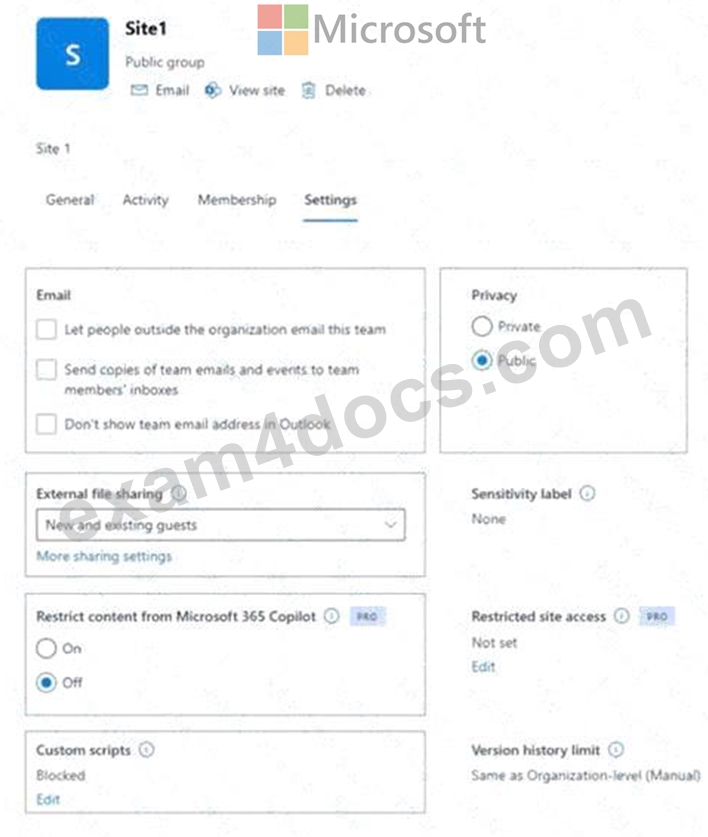
Answer:
Explanation: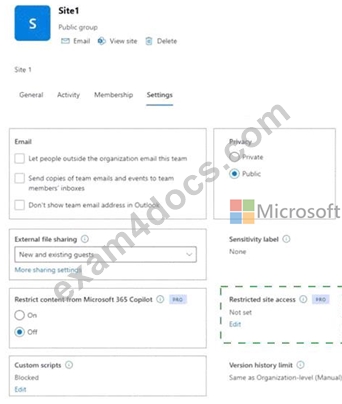
Explanation: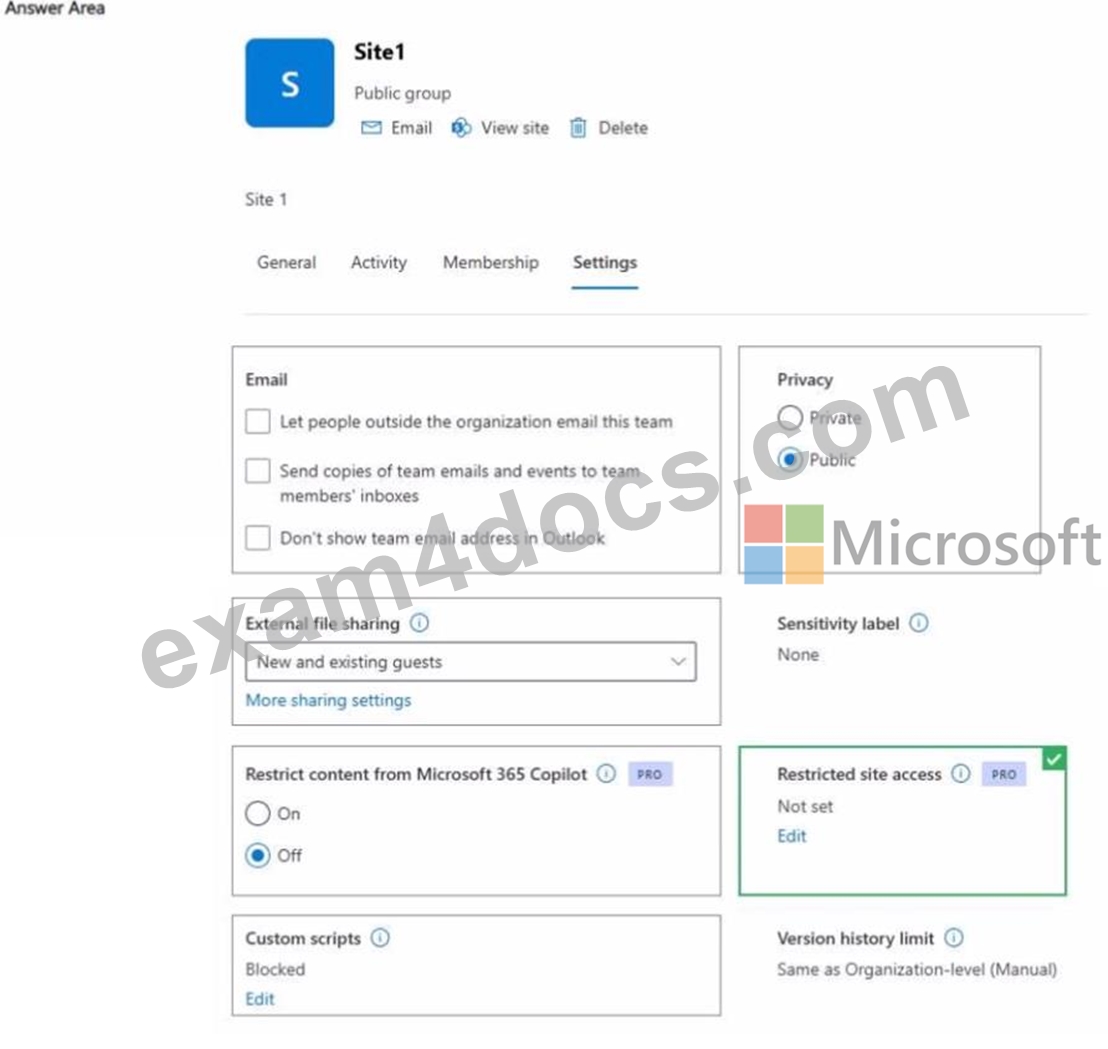
The correct setting is Restricted site access configured with Group1 . Microsoft Learn states that you can restrict access to a SharePoint site by specifying Microsoft Entra security groups or Microsoft 365 groups as the Restricted Access Control group . Microsoft also states that, after the policy is applied, a user can access the site content only if the user both already has permission to the site or content and is a member of the specified restricted access group. This exactly matches the requirement: users who currently have access to Site1 must also be members of Group1 to continue accessing the content.
The Restrict content from Microsoft 365 Copilot setting is unrelated to direct user access to the SharePoint site. That control limits whether Copilot can use site content, but it does not block users from opening the site themselves. Microsoft separately explains that Restricted SharePoint Search and Copilot restrictions are not the same as changing actual SharePoint permissions or access boundaries. So for this scenario, keep the Copilot restriction Off and configure Restricted site access with Group1 .
NEW QUESTION # 71
Select the answer that correctly completes the sentence.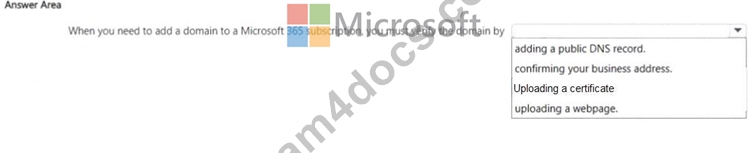
Answer:
Explanation: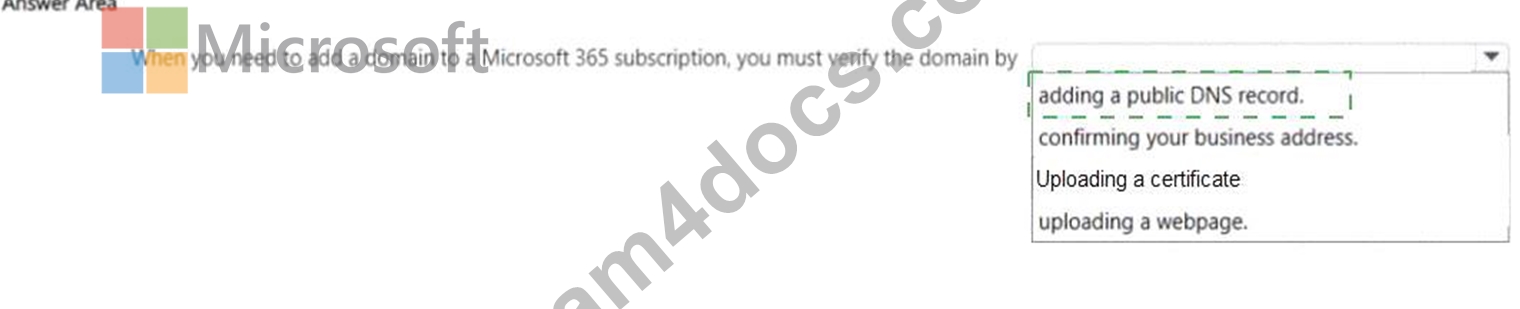
Explanation:
The correct answer is adding a public DNS record . Microsoft documents that when you add a custom domain to Microsoft 365, you must first prove ownership of that domain before Microsoft 365 can use it for services such as Exchange Online, SharePoint, and user sign-ins. The standard verification method described by Microsoft is to add a DNS record at your domain registrar or DNS hosting provider. Microsoft commonly uses a TXT record for verification, although in some cases an MX record can also be used depending on the setup flow. This is why "adding a public DNS record" is the right completion for the sentence.
The other choices are not the standard Microsoft 365 domain verification process. Microsoft's admin guidance does not use confirming your business address , uploading a certificate , or uploading a webpage as the normal method for proving ownership of a domain in Microsoft 365. Domain verification is specifically tied to DNS because DNS is the authoritative public system used to prove control over the domain name.
NEW QUESTION # 72
Your organization has a Microsoft 365 E5 subscription.
You need to prevent users from sharing corporate financial data to external users. What should you use?
- A. insider risk management policies
- B. retention labels
- C. rote groups
- D. data loss prevention (DLP) policies
Answer: D
Explanation:
The correct answer is B. data loss prevention (DLP) policies . Microsoft Learn states that Microsoft Purview Data Loss Prevention helps organizations identify, monitor, and automatically protect sensitive information across Microsoft 365 locations such as Exchange, SharePoint, OneDrive, Teams, and devices .
Microsoft specifically documents scenarios for preventing sensitive items from being shared with external users in SharePoint and OneDrive, and DLP policies can also block or restrict sharing based on sensitive information types, labels, or policy conditions. This is exactly the control used when the requirement is to stop users from sharing corporate financial data outside the organization.
Option A is incorrect because retention labels manage how long content is kept or deleted, not whether it can be shared externally. Option C is incorrect because role groups are used for permissions and administrative access delegation, not content-sharing prevention. Option D is incorrect because Insider Risk Management is designed to detect and investigate risky user behavior, not to directly block external sharing transactions in the way DLP policies do. For proactive enforcement of external-sharing restrictions on sensitive financial information, Microsoft's documented solution is DLP policies .
NEW QUESTION # 73
Your organization has a Microsoft 365 subscription.
Which two tasks can you perform by using the Exchange admin center? Each correct answer presents part of the solution.
NOTE: Each correct selection is worth one point.
- A. Add a custom domain.
- B. Create a mail flow rule.
- C. Create a shared mailbox.
- D. Assign a Microsoft Exchange license.
Answer: B,C
Explanation:
[B]
Mail flow rules (or transport rules) in the Exchange admin center (EAC) for Microsoft 365 allow administrators to manage email flow by setting conditions, exceptions, and actions for messages.
They are configured by navigating to Mail flow > Rules, allowing actions such as rejecting, redirecting, encrypting, or adding disclaimers to messages.
[C]
Shared mailboxes in Microsoft 365 are created via the Exchange admin center (under Recipients > Mailboxes) or the Microsoft 365 admin center (under Teams & Groups).
Incorrect:
[Not A]
Assigning a license to it is typically handled through the Microsoft 365 admin center rather than the EAC.
Reference:
https://office365itpros.com/2022/11/08/mail-flow-rules-new-eac
https://learn.microsoft.com/en-us/microsoft-365/admin/email/about-shared-mailboxes
NEW QUESTION # 74
Your company is evaluating Microsoft 365 Copilot pay-as-you-go billing instead of purchasing a Microsoft 365 Copilot license. In which scenario can pay-as-you-go billing apply?
- A. using the AI assistant to edit a document in Copilot in Word
- B. performing multi-step reasoning by using the Researcher agent
- C. generating a recap of a Microsoft Teams meeting
- D. using a custom agent that is grounded in work data
Answer: D
Explanation:
Microsoft 365 Copilot pay-as-you-go (PAYG) billing is appropriate for custom agents grounded in work data when you want to avoid the $30 per user/month upfront license for every individual who needs access. While standard "declarative" agents grounded only in instructions are often free, agents that access shared tenant data (like SharePoint or Graph Connector content) are considered "metered" and require a billing mechanism.
Reference:
https://www.directionsonmicrosoft.com/reports/understanding-pay-as-you-go-billing-for-m365-copilot-lite-agents/
NEW QUESTION # 75
Hotspot Question
You need to ensure that users can use an external system as a knowledge source for custom Microsoft 365 Copilot agents.
What should you configure in the Microsoft 365 admin center? To answer, select the appropriate settings in the answer area.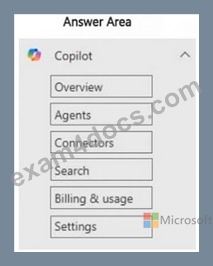
Answer:
Explanation: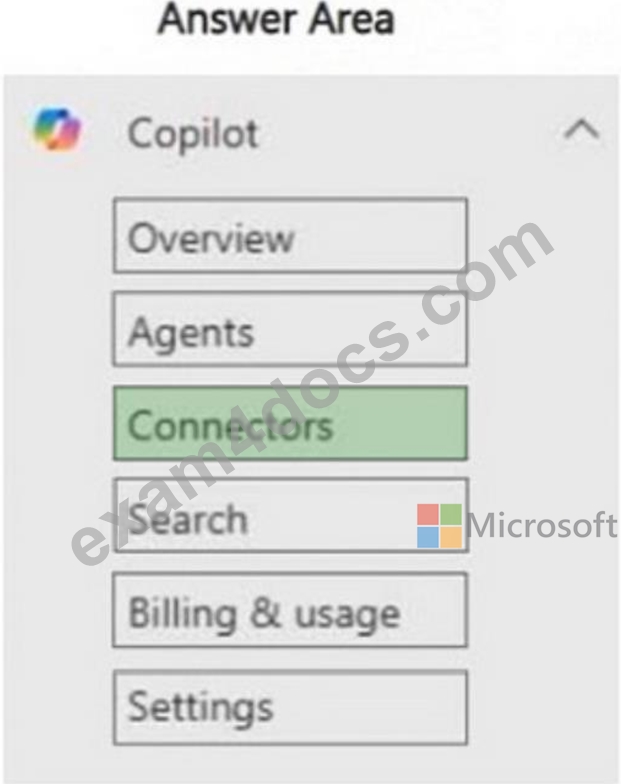
Explanation:
To allow users to use an external system as a knowledge source for custom Microsoft 365 Copilot agents, you need to configure Connectors in the Microsoft 365 admin center under the Copilot section.
Connectors enable Copilot to connect to and ingest data from external systems (such as third- party databases, services, or applications), making that external content available as a knowledge source for custom Copilot agents.
NEW QUESTION # 76
Hotspot Question
For each of the following statements, select Yes if the statement is true. Otherwise, select No.
NOTE: Each correct selection is worth one point.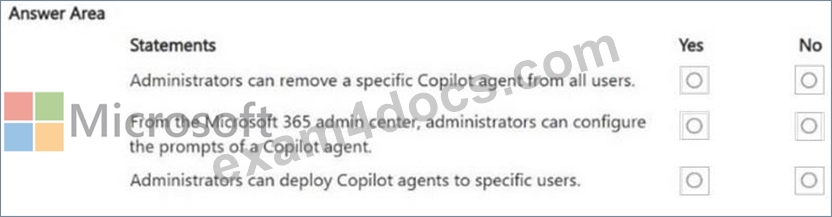
Answer:
Explanation: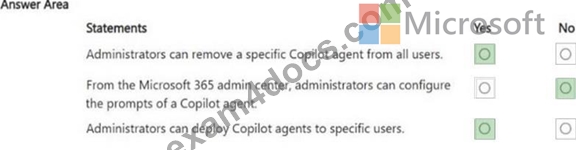
NEW QUESTION # 77
Your company has a Microsoft SharePoint site named Site1. Site1 contains all the policies of the company s HR department. The policies are saved as Microsoft Word documents.
All users have read access to Site1.
The HR department manager reports that user requests about the policies are NOT being addressed in a timely manner, especially around major holidays.
You need to recommend a solution to enable the users to find the HR department policies. The solution must provide the users with a list of common queries and ensure that responses are grounded only in Site1.
What should you include in the recommendation?
- A. the personal assistant in Copilot in Word
- B. a custom Microsoft 365 Copilot agent
- C. the Researcher agent in Microsoft 365 Copilot
- D. a Microsoft 365 Copilot notebook
Answer: B
Explanation:
The correct answer is C. a custom Microsoft 365 Copilot agent . Microsoft Learn explains that Agent Builder in Microsoft 365 Copilot lets you create agents with specific instructions , dedicated knowledge sources , and starter prompts . Starter prompts are designed to help users understand the most common supported scenarios, which directly matches the requirement to provide users with a list of common queries.
Microsoft also documents that an agent can be grounded in selected SharePoint sites, folders, or files , allowing the response scope to be targeted to the HR policy content in Site1 rather than broad enterprise or web data.
The other options do not fit the requirement. Copilot in Word is document-focused and is not intended to create a reusable, shared query experience grounded only in one SharePoint source. Copilot notebooks group materials and chats, but they are not the right tool for publishing a guided HR policy assistant with starter prompts. Researcher is designed for broader, multi-step research using work data and web content, so it does not satisfy the requirement to keep answers grounded only in Site1.
NEW QUESTION # 78
For each of the following statements, select Yes if the statement is true. Otherwise, select No. NOTE Each correct selection is worth one point.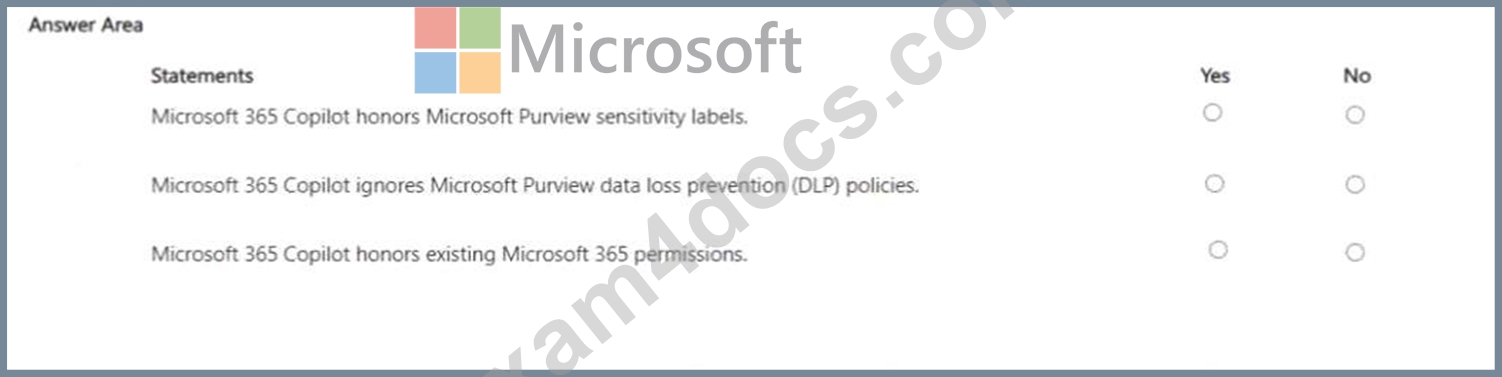
Answer:
Explanation: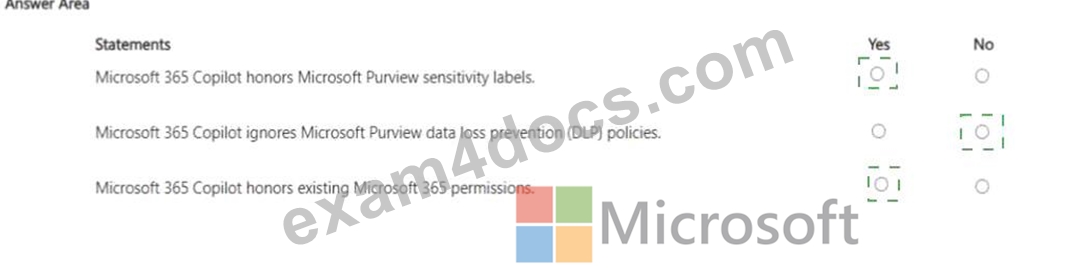
Explanation: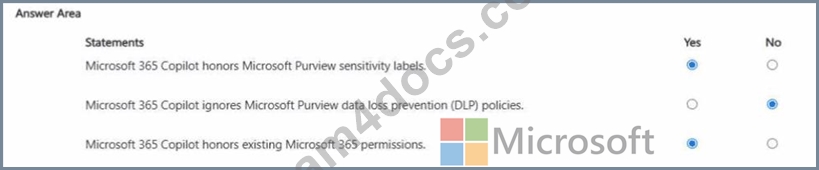
The correct selections are Yes, No, Yes . Microsoft states that Microsoft 365 Copilot inherits the security, compliance, and privacy policies already configured in Microsoft 365, including Microsoft Purview sensitivity labels and other compliance controls. That makes statement 1 Yes . Microsoft also explains that Copilot respects existing access controls and compliance boundaries rather than bypassing them.
Statement 2 is No because Microsoft 365 Copilot does not ignore Microsoft Purview DLP . Microsoft documents that Copilot honors the protections applied to the underlying content and works within Microsoft
365's existing compliance framework. DLP remains part of the environment governing how sensitive data is protected and shared.
Statement 3 is Yes because Microsoft clearly states that Copilot only surfaces content that a user is already authorized to access through existing Microsoft 365 permissions . Copilot uses Microsoft Graph to ground responses, but it does not grant new permissions or expose content outside the user's allowed scope.
Therefore, the correct hotspot answers are Yes , No , and Yes .
NEW QUESTION # 79
Hotspot Question
You are evaluating Microsoft Purview solutions.
For each of the following statements, select Yes if the statement is true. Otherwise, select No.
NOTE: Each correct selection is worth one point.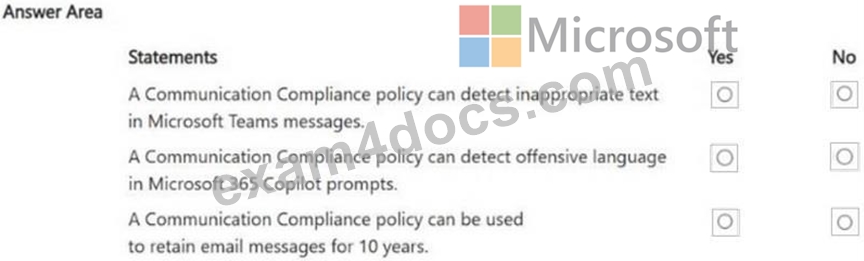
Answer:
Explanation: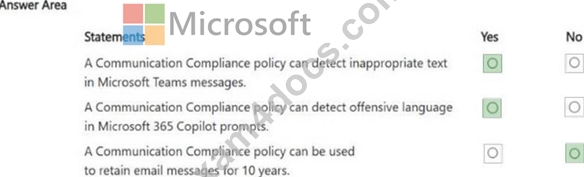
NEW QUESTION # 80
Hotspot Question
Select the answer that correctly completes the sentence.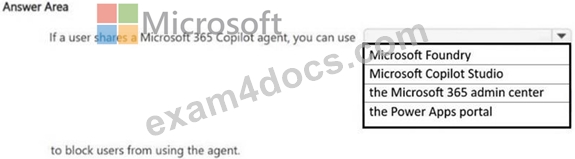
Answer:
Explanation: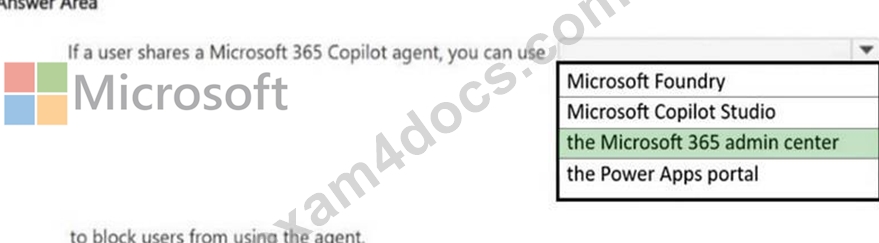
NEW QUESTION # 81
Select the answer that correctly completes the sentence.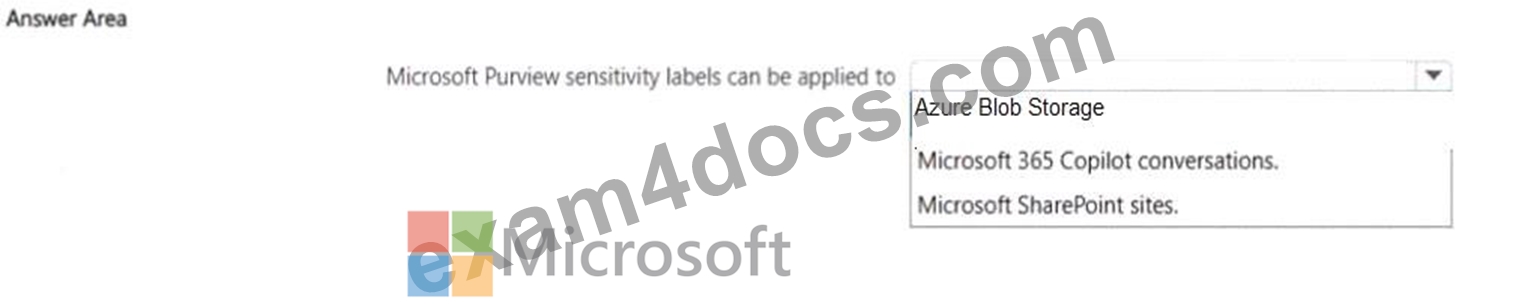
Answer:
Explanation: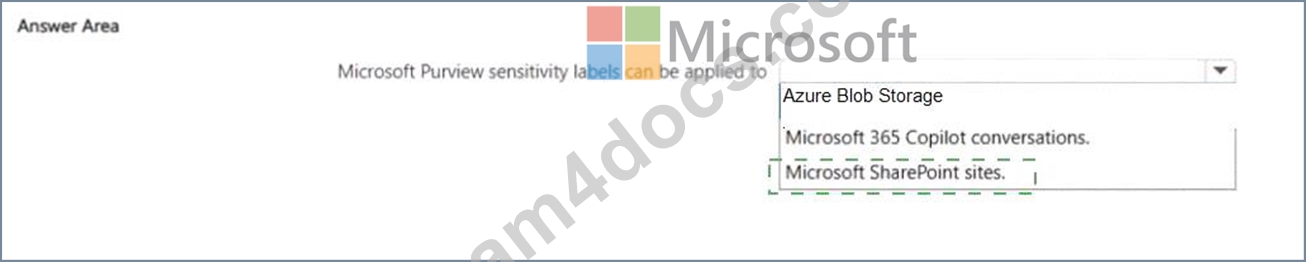
Explanation:
The correct answer is Microsoft SharePoint sites . Microsoft Learn documents that Microsoft Purview sensitivity labels for containers can be applied to Microsoft Teams, Microsoft 365 groups, and SharePoint sites . These labels can control settings such as privacy, external sharing, and unmanaged device access for the labeled site. That is the official Microsoft feature that matches the sentence in the question.
The other options are not the best match for this item. Microsoft 365 Copilot conversations are not the standard object to which admins directly apply a sensitivity label in the way this question is asking. Copilot can honor labels on source content and may display label context in responses, but the selectable resource here is not "Copilot conversations." Azure Blob Storage is also not the intended answer in the Microsoft 365 Copilot and Agent Admin context for Purview sensitivity labels.
So for this hotspot, the sentence is correctly completed with Microsoft SharePoint sites , because Microsoft explicitly supports applying Purview sensitivity labels to SharePoint sites as a container-level labeling capability.
NEW QUESTION # 82
......
Use AB-900 Exam Dumps (2026 PDF Dumps) To Have Reliable AB-900 Test Engine: https://www.exam4docs.com/AB-900-study-questions.html
AB-900 PDF Recently Updated Questions Dumps to Improve Exam Score: https://drive.google.com/open?id=1mynWtinU74ZWn-89MCa1tYfbMJ_BAfFu
